
SOC2 TYPE II Certified · HIPAA · PCI DSS · WC3 (WCAG) 3.0
Unclaimed rewards returned to you — most customers save 23% vs. “free” delivery platforms
Support | 415-386-8600
PLATFORM / AUTOMATION & REMINDERS
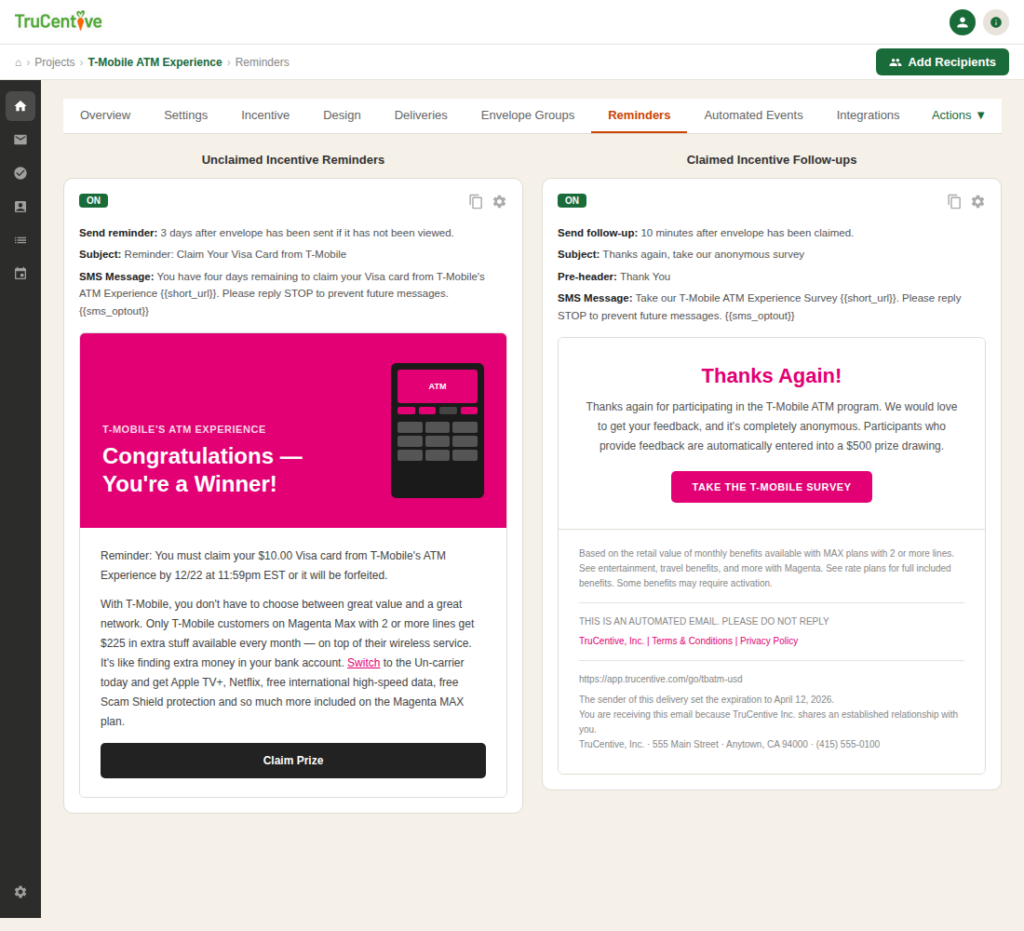
Set a reminder schedule once and TruCentive handles everything. Reminders stop automatically when the recipient claims. HRIS and LMS triggers fire the delivery the moment a milestone is hit — no manual step, no delay.
AUTOMATION USE CASES
TruCentive’s rules engine handles the full lifecycle of every delivery — from trigger to follow-up to refund — without manual intervention.
Send to a list of recipients at a specific date and time, or stagger sends to avoid inbox peaks. Send-time optimisation adjusts for each recipient’s local timezone.
Scheduled sends
Timezone-aware
Work anniversaries, onboarding milestones, and training completions fire automatically from your HRIS or LMS via API — no spreadsheet, no manual export.
API triggers
HRIS & LMS
Configure a reminder cadence — day 3, day 7, 48 hours before expiry — and TruCentive sends each one automatically, stopping as soon as the recipient claims.
Custom cadence
Auto-stop on claim
Set an expiry window per campaign. At expiry, unclaimed rewards are automatically cancelled and the full value is returned to your account balance.
Expiry rules
Auto-refund
Trigger a thank-you message, NPS survey, referral prompt, or upsell offer automatically when a recipient claims — personalised with their name and choice.
Post-claim
NPS survey
Build if-then logic: if claimed within 48 hours skip the reminder; if not opened after 7 days escalate to SMS. No code required.
Branching logic
No code
HOW AUTOMATION WORKS
01
Every automation starts with a trigger: a scheduled date and time, an action a recipient takes or does not take, or an external event fired by your HRIS, LMS, or CRM via webhook.
02
You decide when a reward expires. Set a 7, 30, or 90-day window per campaign. At expiry, the platform cancels the unclaimed reward and returns the full value to your account.
03
The moment a recipient claims, TruCentive can automatically trigger a follow-up: a thank-you note, NPS survey, referral request, or cross-sell prompt. Designed in the same Campaign Builder.
FEATURE DETAIL
Build multi-step automation sequences using a visual flow editor. Add trigger events, wait steps, conditional branches, and channel-switching rules — all through point-and-click configuration.
Configure a reminder cadence once per campaign. The moment a recipient claims, all pending reminders for that recipient are automatically cancelled — no over-messaging, no awkward reminders after claiming.
Connect TruCentive to your HRIS, LMS, CRM, or any system that tracks milestones, completions, or engagement events. When your system fires the trigger, TruCentive sends the delivery.
Every unclaimed reward has a defined expiry date. At expiry, TruCentive automatically cancels the delivery, timestamps the action, and returns the full face value to your account balance.
Set it once. Every send, every reminder, every refund handled automatically — with nothing lost.

We use cookies to improve your experience on our site. By using our site, you consent to cookies.
Manage your cookie preferences below:
Essential cookies enable basic functions and are necessary for the proper function of the website.
Statistics cookies collect information anonymously. This information helps us understand how visitors use our website.
Google Analytics is a powerful tool that tracks and analyzes website traffic for informed marketing decisions.
Service URL: policies.google.com (opens in a new window)
You can find more information: https://trucentive.com/stage/privacy_policy